



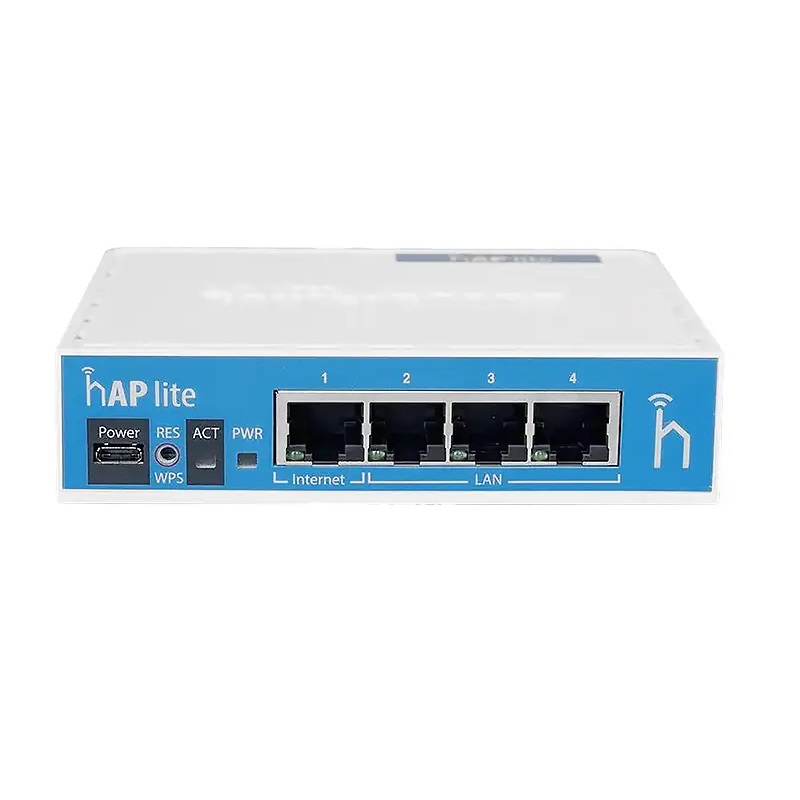


MikroTik hAP lite RB941-2ND
88 AED
Description
MikroTik hAP lite RB941-2ND: Compact Powerhouse for Seamless Networking
The MikroTik hAP lite RB941-2ND is a compact, budget friendly router designed to bring stable wireless connectivity and versatile networking features to small homes, apartments, or offices. Despite its modest size, it packs a powerful punch with a 650 MHz CPU, 32 MB RAM, and 16 MB Flash storage, enabling reliable operation and support for MikroTik RouterOS Level 4.
Its lightweight, discreet design makes it easy to place anywhere, while the 2.4 GHz wireless band (802.11b/g/n) with 2 chains ensures coverage throughout small living or working spaces. The hAP lite is perfect for users seeking a simple, affordable router without sacrificing flexibility, security, or compatibility with a wide range of MikroTik devices.
With four Fast Ethernet ports, support for up to 22 dBm wireless power, and a MicroUSB power input, this device provides a balanced blend of wired and wireless connectivity. Designed to operate in temperatures from 20°C to +70°C, the hAP lite is reliable even in environments with varying conditions.
Key Features of the MikroTik hAP lite RB941-2ND
1. Compact and Lightweight Design
Measuring just 113 x 89 x 28 mm, the hAP lite is unobtrusive and easy to integrate into any room or office space. Its small form factor doesn’t compromise functionality, making it ideal for tight spaces.
2. Efficient CPU and Memory
The QCA9533 650 MHz CPU with 32 MB RAM ensures smooth operation for everyday networking tasks, including internet browsing, video streaming, and moderate data transfer.
3. Reliable Wireless Connectivity
Operating on the 2.4 GHz band with 2 wireless chains, the router delivers stable WiFi coverage up to 22 dBm, sufficient for small to mediumsized areas.
4. Wired Ethernet Ports
Equipped with four 10/100 Mbps Fast Ethernet ports, it provides wired connections for computers, printers, or switches, balancing wireless convenience with reliable cablebased speed.
5. MicroUSB Power Input
The router uses 5V MicroUSB power input, making it compatible with standard adapters or even portable power banks for temporary or mobile setups.
6. Advanced RouterOS Features
With RouterOS Level 4, the hAP lite supports firewalls, NAT, VPNs, hotspot capabilities, and bandwidth management, offering professionallevel control in a consumerfriendly device.
7. Wide Operating Temperature
Designed to function from 20°C to +70°C, this router handles environmental stress better than many competitors in the budget category.
Benefits of Using MikroTik hAP lite RB941-2ND
1. Affordable, Yet Feature Rich
The hAP lite delivers enterprise grade features at a consumer friendly price, allowing users to access RouterOS functionality without breaking the budget.
2. Easy Deployment
Plug and play functionality, combined with flexible power input and compact design, allows the hAP lite to be deployed quickly in homes, apartments, or offices.
3. Dual Connectivity Options
With both wired Ethernet ports and wireless capability, it accommodates multiple devices simultaneously, ensuring seamless network performance.
4. Secure Network Management
RouterOS Level 4 offers firewall protection, VPN support, and bandwidth control, giving users advanced tools to safeguard and optimize their networks.
5. Energy Efficient Operation
The MicroUSB 5V power input ensures low energy consumption, making it an ecofriendly choice for continuous use.
Use Cases: Where the MikroTik hAP lite RB941-2ND Shines
1. Small Homes and Apartments
Perfect for apartments, dorms, or small homes, providing reliable WiFi coverage for multiple devices such as smartphones, laptops, and smart TVs.
2. Small Office Environments
Ideal for small offices with moderate networking needs. It supports basic wired and wireless connectivity for staff, guests, and IoT devices.
3. Travel and Temporary Setups
Its compact form and MicroUSB power input make it portable, suitable for temporary offices, hotel networks, or popup events.
4. Educational Settings
Useful in classrooms or labs where multiple students need access to the internet or internal resources, supporting lightweight network management.
How to Set Up and Secure Your MikroTik hAP lite RB941-2ND
1. Power On – Connect a MicroUSB adapter to the router and plug it into a power source.
2. Access RouterOS – Use a web browser or WinBox utility to access the configuration interface.
3. Change Default Passwords – Immediately update admin credentials to secure the network.
4. Configure Wireless – Set SSID, encryption (WPA2 or WPA3 if supported), and password for safe access.
5. Set Firewall Rules – Enable basic firewall rules to protect devices from unauthorized access.
6. Monitor Network Traffic – Use RouterOS tools to observe bandwidth usage, connected devices, and traffic patterns.
Following these steps ensures both performance and security, even for first time users.
Hidden Gem: Use it as a WiFi Repeater
Beyond standard router functionality, the hAP lite can function as a WiFi repeater, extending the range of an existing network. This is ideal for areas with weak WiFi signals, such as hallways, basements, or outdoor patios. By leveraging its dual chain wireless capabilities and RouterOS settings, users can amplify coverage without purchasing additional high cost hardware.
Comparison: MikroTik hAP lite RB941-2ND vs Similar MikroTik Products
| Feature | hAP lite RB941-2ND | hAP ac lite | hAP ac² | RB750Gr3 |
|---|---|---|---|---|
| CPU | QCA9533 650 MHz | QCA9531 650 MHz | 650 MHz | 850 MHz |
| RAM | 32 MB | 64 MB | 128 MB | 128 MB |
| Ethernet Ports | 4 x 10/100 Mbps | 5 x 10/100 Mbps | 5 x 1G | 5 x 100 Mbps |
| Wireless | 2.4 GHz 802.11b/g/n | 2.4 GHz 802.11b/g/n | Dual-band 2.4/5 GHz | None |
| Antenna Gain | 1.5 dBi | 2 dBi | 2.5 dBi | – |
| Max Wireless Power | 22 dBm | 22 dBm | 25 dBm | – |
| Power Input | 5V MicroUSB | 5V MicroUSB | 12V DC | 8–30V DC |
| Best Use Case | Small home/office | Small homes | Medium homes/offices | Budget wired setups |
The MikroTik hAP lite RB941-2ND excels in compact deployments where cost, portability, and basic wireless performance are priorities, while other models provide higher bandwidth, dualband WiFi, or gigabit Ethernet for larger networks.
Technical Specifications Table of MikroTik hAP lite RB941-2ND
| Specification | Value |
|---|---|
| Product Code | RB941-2ND (hAP lite) |
| CPU | QCA9533 650 MHz |
| RAM | 32 MB |
| Storage | 16 MB Flash |
| Operating System | MikroTik RouterOS Level 4 |
| Ethernet Ports | 4 x 10/100 Mbps Fast Ethernet |
| Wireless Standards | 2.4 GHz 802.11b/g/n |
| Wireless Chains | 2 |
| Antenna Gain | 1.5 dBi |
| Max Wireless Power | 22 dBm |
| Power Input | 5V MicroUSB |
| Dimensions | 113 x 89 x 28 mm |
| Operating Temperature | -20°C to +70°C |
| License Level | 4 |
Frequently Asked Questions (FAQ)
1. Is the hAP lite suitable for large homes?
It’s best for small to medium spaces; larger homes may require additional access points or repeaters.
2. Can it run dual band WiFi?
No, the hAP lite operates only on 2.4 GHz; dual band functionality is available in higher tier MikroTik models.
3. What devices are compatible with RouterOS Level 4?
Most small MikroTik routers and access points can run Level 4, allowing advanced features such as firewall and hotspot.
4. Can I use it as a repeater?
Yes, it can extend the range of an existing network using RouterOS configuration settings.
5. How do I power the device?
It uses a standard 5V MicroUSB adapter, making it easy to power from common adapters or power banks.
6. Is it safe for continuous operation?
Yes. Operating temperatures from 20°C to +70°C make it reliable for daily use in varied environments.
About MRHPE
MRHPE specializes in delivering high quality networking solutions and accessories. As a trusted provider, MRHPE ensures that devices like the MikroTik hAP lite RB941-2ND are shipped with verified quality and supported by technical guidance for seamless deployment. MRHPE has become a reliable partner for enterprises, ISPs, and networking professionals worldwide, offering comprehensive support and competitive pricing.
Additional information
| CPU |
QCA9533 650 MHz |
|---|---|
| RAM |
32 MB |
| Storage |
16 MB Flash |
| Operating System |
MikroTik RouterOS (Level 4) |
| Ethernet Ports |
4 x 10/100 Mbps Fast Ethernet |
| Wireless Standard |
2.4 GHz 802.11b/g/n |
| Wireless Chains |
2 |
| Antenna Gain |
1.5 dBi |
| Max Wireless Speed |
22 dBm |
| Power Input |
5V MicroUSB |
| Operating Temperature |
-20°C to +70°C |
| License |
4 |
Reviews (0)
Shipping and Delivery


Related products


MikroTik CRS112-8G-4S-IN Switch
The MikroTik CRS112-8G-4S-IN Switch is a compact, fanless, and versatile managed switch designed to meet the demands of modern small offices, MRHPEgrade home labs, and branch deployments. With 8 Gigabit Ethernet ports, 4 SFP slots, and RouterOS Level 5, it provides flexible connectivity, robust VLAN segmentation, QoS management, and centralized network control. Its fanless design ensures silent operation, while low power consumption increases energy efficiency. Reliable, compact, and featurerich, the CRS112-8G-4S-IN is the ideal solution for network administrators seeking dependable performance and scalability in a small form factor.


MikroTik CRS312-4C+8XG-RM Switch
The MikroTik CRS312-4C+8XG-RM Switch is a formidable networking instrument designed for environments that rely on high throughput, low latency, and professional grade stability. Its 12port architecture—blending eight 10G SFP+ ports with four highly adaptable combo ports—creates a flexible foundation for modern network design. Whether powering enterprise backbones, assisting in creative production environments, or acting as a central aggregation point for dense fiber traffic, it brings efficiency and clarity to even the most demanding infrastructure.


MikroTik CRS312-4C+8XG-RM Switch
The MikroTik CRS3124C+8XGRM Switch is a versatile and high performance solution for small to medium sized enterprises, data centers, and service providers. Its combination of 10G SFP+ ports, Gigabit Ethernet, RouterOS capabilities, and compact rackmount design makes it ideal for a variety of network environments.
Whether connecting servers, storage systems, or uplinks, the CRS3124C+8XGRM ensures reliable, highspeed performance. With MRHPE as a trusted partner, deploying this switch guarantees both genuine hardware and robust professional support, making it a futureproof choice for modern network infrastructure.


MikroTik CRS510-8XS-2XQ-IN Switch
MikroTik CRS510-8XS-2XQ-IN Switch Switch stands out as a refined, highcapacity, and versatile network switch designed for modern infrastructures that demand reliability and speed. Its silent operation, fiberrich port layout, and deep feature set powered by RouterOS make it an exceptional choice for data centers, enterprises, and ISPs.
Its balance of compact size, powerful switching capabilities, intelligent routing features, and fan less design creates a device that easily adapts to professional environments where performance and stability matter most. For organizations that require high throughput, flexible management, and longterm dependability, the MikroTik CRS510-8XS-2XQ-IN Switch offers exceptional value and robust technological sophistication.


MikroTik RB260GSP 5Port Gigabit
The MikroTik RB260GSP 5Port Gigabit is a versatile, compact, and PoEenabled switch designed for MRHPEgrade deployments, small offices, home labs, and surveillance networks. Its combination of five Gigabit ports, PoE output, fiber uplink support, and SwitchOS management makes it an ideal choice for administrators seeking simplicity without sacrificing functionality.
With reliable performance, flexible VLAN configuration, energyefficient design, and broad operating temperature tolerance, the RB260GSP stands as a robust networking solution. Its compact footprint allows seamless integration into desktops, small racks, or remote locations, delivering highspeed connectivity and centralized power distribution for modern networking needs.


MikroTik SXT LTE6 kit SXTR&FG621-EA
MikroTik SXT LTE6 kit SXTR&FG621-EA is an exceptional choice for users demanding a rugged, highperformance LTE solution. Its advanced Cat 6 modem, highgain directional antenna, dependable RouterOS capabilities, and durable outdoor construction transform weak LTE areas into stable, fast, and reliable internet zones.
It is ideal for rural homes, business backup links, CCTV systems, industrial environments, and longdistance LTE connections. The device balances power, simplicity, and resilience—making it an outstanding investment for anyone who requires premium wireless connectivity without relying on traditional broadband.

Mikrotik XS+DA0003 SFP 1G, SFP+ 10G
Mikrotik XS+DA0003 SFP 1G, SFP+ 10G Direct Attach Cable is a wellcrafted, ultraefficient, and deploymentready solution for modern shortreach networking. With its MRHPEgrade reliability, energylean design, and seamless compatibility, it simplifies highspeed interconnects within data centers, enterprise infrastructures, ISP installations, and technical laboratories.
By uniting affordability, low latency, and robust construction, this cable emerges as an indispensable component for networks seeking predictable and performancerich SFP/SFP+ connectivity without the complexities of optical hardware. Its balanced 3meter reach and passive Twinax foundation make it a standout choice for organizations that value efficiency, precision, and longterm durability in their digital frameworks.
Reviews
There are no reviews yet.