



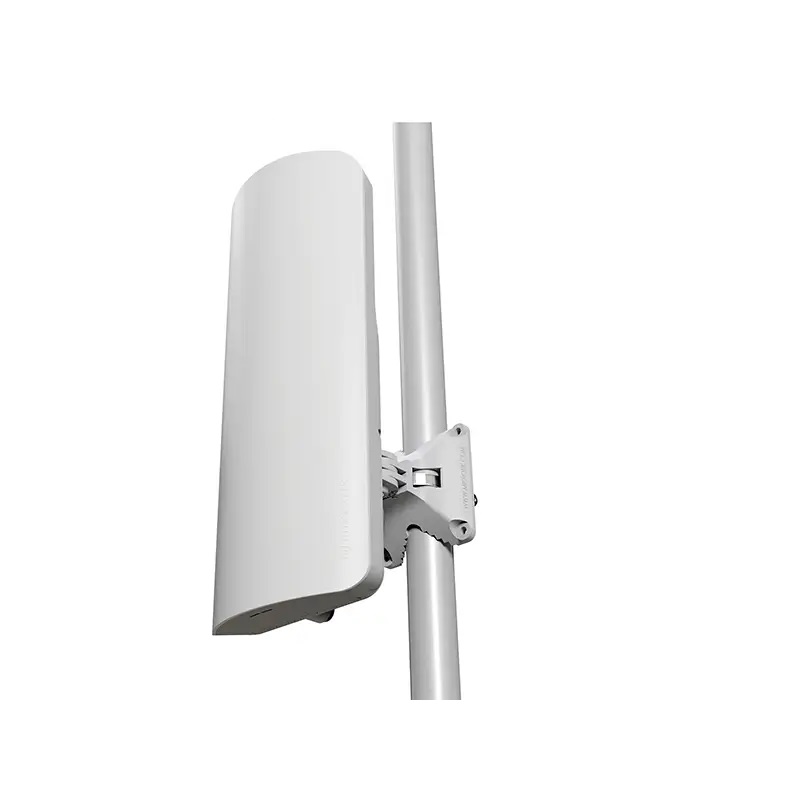


MikroTik mANTBox ax 15s L22UGS-
608 AED
The MikroTik mANTBox ax 15s L22UGS-is a premier outdoor WiFi 6 solution, combining highspeed performance, long range coverage, and resilient hardware. With advanced RouterOS features, dual Ethernet and SFP connectivity, and a 15 dBi sector antenna, it is ideal for ISPs, enterprises, and high demand outdoor installations. Rugged, energy efficient, and versatile, the mANTBox ax 15s is engineered to provide reliable, futureproof wireless networking solutions. MRHPE ensures accessibility and support, making it the definitive choice for professional grade outdoor connectivity.
Description
MikroTik mANTBox ax 15s L22UGS- : Redefining Outdoor WiFi 6 Connectivity
MikroTik mANTBox ax 15s L22UGS- is a cutting edge outdoor WiFi 6 (802.11ax) access point, engineered for highspeed, long range wireless performance. Designed to thrive in challenging outdoor environments, this device blends sleek design with powerful functionality. Unlike traditional access points, it harnesses the advanced capabilities of WiFi 6 technology, enabling faster speeds, reduced latency, and greater network efficiency.
With a robust 15 dBi sector antenna and a high performance Qualcomm IPQ6010 Quadcore 1.8 GHz CPU, the mANTBox ax 15s delivers unmatched reliability for both enterprise deployments and demanding residential networks. Its 2×2 MIMO configuration ensures simultaneous multidevice connectivity, making it ideal for densely populated areas. Moreover, the unit operates within a wide temperature range of 40°C to +70°C, proving its resilience in extreme weather conditions.
Whether extending a wireless network across urban rooftops, providing internet access for large outdoor venues, or powering pointtomultipoint links, the mANTBox ax 15s offers unparalleled flexibility and performance. Integrated RouterOS Level 4 adds advanced routing, firewall, and traffic management options, transforming this device into a versatile networking powerhouse. MRHPE provides it.
Top Features of MikroTik mANTBox ax 15s L22UGS-
MikroTik mANTBox ax 15s L22UGS- combines innovative hardware with feature rich software, making it a standout choice for outdoor wireless deployments. Its key features include:
- WiFi 6 (802.11ax) Standard: Supports faster data transfer, improved spectral efficiency, and better multidevice performance.
- 5 GHz Frequency Band: Ideal for longrange outdoor connections with minimal interference.
- HighGain 15 dBi Sector Antenna: Extends coverage, focusing signal strength in targeted directions.
- 2×2 MIMO Configuration: Provides simultaneous connectivity for multiple devices without degrading performance.
- Dual Connectivity Options: 1x Gigabit Ethernet port plus 1x SFP for fiber integration or extended wired connectivity.
- Advanced CPU & Memory: Qualcomm IPQ6010 Quadcore 1.8 GHz CPU with 1 GB RAM ensures fast processing and smooth operation.
- 128 MB NAND Storage: Sufficient memory for RouterOS configurations and firmware updates.
- Power over Ethernet (802.3af/at): Simplifies deployment by delivering power and data through a single cable.
- OutdoorReady Design: Weatherproof casing withstands extreme temperatures and environmental stress.
- Flexible Mounting Options: Compatible with pole and wall mounts for versatile installation.
Key Benefits of Using mANTBox ax 15s
Deploying the MikroTik mANTBox ax 15s L22UGS- brings several tangible benefits:
1. HighSpeed Wireless: Achieves up to 1200 Mbps, ensuring fast and responsive connections.
2. Efficient MultiDevice Handling: WiFi 6 and 2×2 MIMO support simultaneous traffic without slowdowns.
3. Reliable Outdoor Performance: Operates in harsh conditions, perfect for urban and remote locations.
4. Enhanced Network Management: RouterOS Level 4 provides full control over routing, firewall, and network monitoring.
5. Expandable Connectivity: Gigabit Ethernet and SFP ports allow integration with various network infrastructures.
6. Energy Efficient: Max power consumption under 18 W reduces operating costs.
7. Long Term Investment: Durable hardware and futureproof WiFi 6 standard provide a lasting solution for evolving network demands.
Use Cases & Applications
The mANTBox ax 15s excels in a wide range of scenarios:
- Urban WiFi Networks: Deliver stable, highspeed internet across densely populated areas.
- Point to Multipoint Links: Connect multiple clients in outdoor environments with minimal interference.
- Enterprise & Campus Networks: Provide reliable coverage for offices, campuses, and large facilities.
- Event Venues & Outdoor Installations: Perfect for concerts, sports arenas, and public hotspots.
- Rural Internet Access: Extend connectivity to remote areas without traditional wired infrastructure.
How to Maximize Performance with MikroTik mANTBox ax 15s L22UGS-
To achieve optimal performance, consider these strategies:
- Position the antenna for unobstructed lineofsight coverage.
- Utilize the RouterOS Level 4 advanced settings to finetune wireless channels and bandwidth.
- Use highquality PoE injectors for stable power delivery.
- Regularly update firmware to access the latest security patches and feature enhancements.
- Combine SFP connectivity for redundancy or fiberbased backbone connections.
- Adjust MIMO settings based on the number of simultaneous clients to maximize throughput.
Comparison with Similar MikroTik Devices
| Feature / Model | MikroTik mANTBox ax 15s | MikroTik Audience ax | MikroTik BaseBox 5 RB912UAG | MikroTik wAP 5 |
|---|---|---|---|---|
| Wireless Standard | Wi-Fi 6 (802.11ax) | Wi-Fi 6 (802.11ax) | 802.11a/n | 802.11a/n |
| Frequency Band | 5 GHz | 2.4/5 GHz | 5 GHz | 5 GHz |
| Antenna Gain | 15 dBi Sector | 5 dBi Omni | 2x RP-SMA | Integrated |
| MIMO Configuration | 2×2 | 2×2 | 2×2 | 2×2 |
| CPU | Qualcomm IPQ-6010 Quad-core 1.8 GHz | Qualcomm IPQ-6010 | AR9342 600 MHz | QCA9531 650 MHz |
| Ethernet / SFP | 1x Gigabit + 1x SFP | 1x Gigabit + 1x SFP | 1x Gigabit | 1x Fast Ethernet |
| PoE | 802.3af/at | 802.3af/at | 8–30V Passive PoE | 802.3af |
| Outdoor Rating | Rugged, -40°C to +70°C | Indoor/Outdoor | Outdoor | Indoor/Outdoor |
| Use Case | Long-range outdoor, sector coverage | Indoor/outdoor mesh | WISP/Point-to-Point | Small outdoor AP |
Technical Specifications Table
| Feature | Specification |
|---|---|
| Product Code | L22UGS-5HaxD2HaxD-15S |
| Wireless Standard | Wi-Fi 6 (802.11ax) |
| Frequency | 5 GHz |
| Antenna Gain | 15 dBi sector |
| MIMO Configuration | 2×2 |
| Max Data Rate | Up to 1200 Mbps |
| CPU | Qualcomm IPQ-6010, Quad-core 1.8 GHz |
| RAM | 1 GB |
| Storage | 128 MB NAND |
| Ethernet Port | 1x Gigabit Ethernet + 1x SFP |
| PoE In | 802.3af/at |
| Max Power Consumption | <18 W |
| Operating System | RouterOS Level 4 |
| Operating Temperature | -40°C to +70°C |
| Dimensions | 140 x 348 x 82 mm |
| Weight | ~1.35 kg |
| Mounting | Pole-mount and wall-mount ready |
Frequently Asked Questions (FAQ)
Q: Is the mANTBox ax 15s suitable for harsh outdoor environments?
A: Yes. It operates in temperatures from 40°C to +70°C and has a rugged weatherproof design.
Q: Can it connect to fiber networks?
A: Yes, the SFP port enables fiber connectivity for highspeed backbone links.
Q: How many devices can it handle simultaneously?
A: With WiFi 6 and 2×2 MIMO, it efficiently manages multiple clients without significant speed degradation.
Q: What is the maximum data rate?
A: Up to 1200 Mbps on the 5 GHz band.
Q: What power options are available?
A: It supports 802.3af/at PoE for simple and efficient power deployment.
How to Set Up MikroTik mANTBox ax 15s L22UGS-: Step by Step
Step 1: Unbox & Mount
Secure the device on a pole or wall using the included mounting kit.
Step 2: Power the Device
Connect to a compatible 802.3af/at PoE injector or switch.
Step 3: Connect to Your PC
Use an Ethernet cable to link the mANTBox ax 15s to a computer.
Step 4: Login via WinBox or WebFig
Open the RouterOS management interface using WinBox or a web browser.
Step 5: Update Firmware (Recommended)
Check for the latest RouterOS firmware and install to ensure security and performance.
Step 6: Set a Secure Admin Password
Create a strong password to protect access to the device configuration.
Step 7: Configure Wireless (Access Point Mode)
Set SSID, encryption type, and channel settings to optimize wireless performance.
Step 8: Configure IP Addressing
Assign static IPs or configure DHCP as required for your network setup.
Step 9: Bridge Ethernet & Wireless (if needed)
Enable bridging to allow seamless connectivity between wired and wireless networks.
Step 10: Save Configuration
Ensure all changes are saved to preserve settings after reboot.
About MRHPE
specializing in HPE servers, Cisco networking equipment, and data center infrastructure solutions. We provide a wide range of new and refurbished IT products to clients across the UAE, Saudi Arabia, Qatar, Oman, Bahrain, Africa, Russia, and Central Asia, helping organizations build efficient, reliable, and scalable IT environments.
Additional information
| Weight | 1350 g |
|---|---|
| Dimensions | 140 × 348 × 82 mm |
| Wireless Standard |
Wi-Fi 6 (802.11ax) |
| Frequency Range |
5 GHz |
| Antenna Gain |
15 dBi sector |
| MIMO Configuration |
2×2 |
| Max Data Rate |
Up to 1200 Mbps |
| CPU |
Quad-core 1.8 GHz ,Qualcomm IPQ-6010 |
| RAM |
1 GB |
| Storage |
16 MB NAND |
| Ethernet Ports |
1x Gigabit Ethernet + 1x SFP |
| PoE-in |
802.3af/at |
| Max Power Consumption |
<18 W |
| Operating System |
MikroTik RouterOS Level 4 |
| Operating Temperature |
-40°C to +70°C |
Reviews (0)
Shipping and Delivery


Related products


MikroTik CRS309-1G-8S+IN Switch
The MikroTik CRS309-1G-8S+IN Switch Switch is a sophisticated yet compact networking device that masterfully balances performance, silence, and fiberfocused efficiency. Its eight 10G SFP+ ports, flexible OS options, and whisper quiet passive cooling make it a formidable choice for enterprise networks, data centers, studios, and high demand infrastructures. Whether serving as an aggregation point or powering a highspeed workstation cluster, this switch offers durability, speed, and operational precision in a sleek and functional package.


MikroTik CRS326-24G-2S+IN Switch
The MikroTik CRS32624G2S+IN Switch is a compact, silent, and versatile network solution. With 24 Gigabit RJ45 ports, 2 SFP+ 10G uplinks, dual switch chips, and dualboot OS capabilities, it is ideal for MRHPEgrade labs, silent offices, and smalltomedium enterprise networks. Its passive, fanless cooling ensures quiet operation, while wirespeed forwarding, VLAN support, and basic Layer 3 functionality provide robust performance.
For administrators seeking a balance of performance, flexibility, and discretion, the CRS32624G2S+IN offers a compelling, futureproof solution capable of handling evolving network demands with ease.


MikroTik CRS326-4C+20G+2Q+RM Switch
MikroTik CRS3264C+20G+2Q+RM Switch is a highperformance, flexible, and MRHPEready solution for modern networks. With 20 Gigabit ports, 4 combo RJ45/SFP ports, and 2 QSFP+ 40G uplinks, it provides a reliable backbone for enterprise and lab environments. Dualboot OS capabilities allow administrators to choose between advanced routing or streamlined Layer 2 switching, while passive cooling and dual redundant power supplies ensure uninterrupted operation.
Ideal for VLANrich environments, highdensity access deployments, and futureproof 40G uplinks, the CRS326 balances performance, scalability, and efficiency. It is a compelling choice for network engineers, MRHPE enthusiasts, and enterprises seeking a robust, versatile, and dependable switch for years to come.


MikroTik CRS510-8XS-2XQ-IN Switch
MikroTik CRS510-8XS-2XQ-IN Switch Switch stands out as a refined, highcapacity, and versatile network switch designed for modern infrastructures that demand reliability and speed. Its silent operation, fiberrich port layout, and deep feature set powered by RouterOS make it an exceptional choice for data centers, enterprises, and ISPs.
Its balance of compact size, powerful switching capabilities, intelligent routing features, and fan less design creates a device that easily adapts to professional environments where performance and stability matter most. For organizations that require high throughput, flexible management, and longterm dependability, the MikroTik CRS510-8XS-2XQ-IN Switch offers exceptional value and robust technological sophistication.


MikroTik CRS518-16XS-2XQ-RM Switch
The MikroTik CRS518-16XS-2XQ-RM Switch is a high density, high performance, and future ready network solution. Its combination of 16×10GbE ports and 2×40GbE uplinks, supported by RouterOS, ensures seamless operation in high traffic, mission critical environments.
Whether deployed in a data center backbone, enterprise core network, ISP aggregation node, or media production facility, the CRS518 delivers scalable, reliable, and ultrafast connectivity. With a sturdy build, efficient cooling, and customizable software capabilities, it is engineered to meet the evolving demands of modern networks.


MikroTik SXT LTE6 kit SXTR&FG621-EA
MikroTik SXT LTE6 kit SXTR&FG621-EA is an exceptional outdoor LTE device crafted for users who require resilient, highperformance mobilenetwork connectivity. Its powerful Cat 6 modem, longrange 17 dBi directional antenna, and rugged housing work together to deliver stable, highspeed internet in locations where ordinary LTE routers simply cannot cope.
From rural homes and construction sites to industrial systems, surveillance networks, and business failover setups, this device is built for scenarios where reliability is essential. With superior LTE reception, excellent environmental durability, and the configurability of RouterOS, it stands out as a robust and futureproof communications solution.

Mikrotik XS+DA0003 SFP 1G, SFP+ 10G
Mikrotik XS+DA0003 SFP 1G, SFP+ 10G Direct Attach Cable is a wellcrafted, ultraefficient, and deploymentready solution for modern shortreach networking. With its MRHPEgrade reliability, energylean design, and seamless compatibility, it simplifies highspeed interconnects within data centers, enterprise infrastructures, ISP installations, and technical laboratories.
By uniting affordability, low latency, and robust construction, this cable emerges as an indispensable component for networks seeking predictable and performancerich SFP/SFP+ connectivity without the complexities of optical hardware. Its balanced 3meter reach and passive Twinax foundation make it a standout choice for organizations that value efficiency, precision, and longterm durability in their digital frameworks.
Reviews
There are no reviews yet.